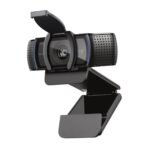
The MX Brio is a 4K webcam built for clear calls and streams. It pairs dual beam-forming microphones that reduce noise with 4x digital zoom, a built-in privacy shutter, a detachable USB-C cable, a tripod mount, Show Mode, and 1080p at 60fps or 4K.
Logitech’s most advanced webcam to date
- The most advanced webcam Logitech has made so far
- Up to 2x finer image detail and face visibility compared with the Brio 4K
- Share your desk with Show Mode
- Fine-tune your picture with advanced controls
- AI-assisted background noise reduction
- BUILT-IN PRIVACY SHUTTER
Logitech’s most advanced webcam to date
Join meetings and stream in UHD 4K at 30fps, or in 1080p at 60fps, with Logitech’s most advanced webcam sensor. Its pixels are 70% larger, which gives sharp, detailed images with accurate colour.
Up to 2x finer image detail and face visibility compared with the Brio 4K
The MX Brio delivers 2x finer image detail and face visibility over the Brio 4K, and keeps you well lit in dim rooms or when backlit. AI-based face enhancement keeps you looking sharp, while auto exposure, auto white balance and image noise reduction keep the picture natural and crisp.
Show Mode for your work
Tilt the webcam down to show your notes and sketches on the desk during a call, which makes collaboration easier.
Advanced controls for your picture
Adjust your video in Logi Options+ or G Hub using Fine Controls, including lighting, white balance, ISO, shutter speed, tint, vibrance and more. You can also leave it to Auto mode.
Background noise reduction
Two integrated beam-forming microphones use AI to suppress background sound, so your voice comes through clearly.
BUILT-IN PRIVACY SHUTTER
Between meetings, rotate the built-in privacy shutter to fully cover the lens.
Specifications
| Brand |
Logitech |
| Model |
Logitech MX Brio |
| Supported resolutions |
4K/30fps (3840×2160 pixels), 1080p/60fps (1920×1080 pixels). |
| Focus type |
Advanced Autofocus |
| Lens type |
Glass |
| Diagonal field of view (dFoV) |
90°/78°/65° |
| Zoom |
4x digital zoom |
| Image sensor |
8.5MP Sony STARVIS |
| Built-in mic |
Dual Beamforming microphone for noise reduction |
| Mic range |
Up to 4ft (1.2m) |
| Requirements |
USB-C port supporting the USB 3.0 standard Logi software on macOS and Windows*. *Requires Logi software, available for Windows and macOS at Logitech MX Brio page |
| Compatibility |
Windows 10 or later macOS 10.15 or later ChromeOS* Linux*. *Basic webcam support using the USB Video Class (UVC) standard. No Logitech software for other systems than Windows and macOS |
| Certified for |
Microsoft Teams, Zoom, Google Meet, Works With Chromebook, Streamlabs |
| Works with |
Zoom, Teams, WebEx, Skype, FaceTime, Google Meet, Streamlabs, OBS |
| Cable length |
5 ft (1.5 m) |
| USB connectivity |
Detachable USB-C to USB-C cable, supporting USB 3.0 standard |
| Privacy shutter |
Built-in privacy shutter |
| Mounting options |
Detachable universal mounting clip. Fits laptops, LCD displays, or monitors. |
| Tripod Thread |
Standard ¼” inch thread to mount on tripods |
| RightLight 5 with face-based image enhancement |
Auto-focus, HDR, white balance, exposure, for a clear image in various lighting environments ranging from low light to direct sunlight |
| Show Mode |
Yes |
| Fine image controls |
With optional Logi Options+ or G HUB software |
| Height |
44 mm |
| Width |
98 mm |
| Depth |
36 mm |
| Weight |
137 g |
| Height |
62 mm |
| Width |
98 mm |
| Depth |
52 mm |
| Weight |
176 g |
| Height |
20 mm |
| Width |
38 mm |
| Colours |
Pale Gray, Graphite |
What’s in the box
- MX Brio
- Mount clip with removable adapter
- USB-C to C 3.0 cable
- User documentation
Delivery and warranty
- Same-day delivery in Dubai, and 1–2 days across the UAE
- Cash on delivery
- Warranty and 7-day easy returns
- Prices include 5% VAT




 Overview





Reviews
There are no reviews yet.