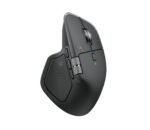
Work with more rhythm using the Logitech MX Master 4, featuring haptic feedback, MagSpeed scrolling, an 8K DPI sensor and Logi Options+ customisation.
Key features
- Logitech’s most advanced wireless mouse, now with extra power
- Get absorbed in the Haptic Sense Panel
- Cut your time by up to 33% with Actions Ring shortcuts*
- Sense accuracy through native haptics on Windows 11
- Scroll through 1,000 lines every second
- Track on almost any surface, including glass*, with the 8K DPI sensor
Logitech’s most advanced wireless mouse, now with extra power
The MX Master 4 is a high-performance mouse with haptic feedback, built for a focused and precise way of working that you can actually feel. Save up to 33% of your time* with Actions Ring shortcuts, which place tools and actions right under your cursor.
Get absorbed in the Haptic Sense Panel
Customisable* haptic feedback can be assigned to specific actions, shortcuts and notifications to help you stay productive. You will feel images snapping to grids, alerts, switching desktops, slider adjustments and more. Adjust the feedback and its intensity, or add plugins for third-party apps through Logi Options+ for a setup that suits you.
Cut your time by up to 33% with Actions Ring shortcuts*
The Actions Ring keeps your work moving by putting your favourite tools, shortcuts and actions at your cursor. There is no need to dig through menus, and you can cut your mouse movement by up to 63%*. Set up your own shortcuts and download third-party app plugins with Logi Options+ so the Actions Ring works the way you do.
Sense accuracy through native haptics on Windows 11
The MX Master 4 offers native integration with Advanced Haptics on Windows 11.* You can feel precision when arranging windows, aligning objects in PowerPoint and using other compatible apps. Manage the native Windows haptics from the Windows settings, and update the MX Master 4 firmware from the Options+ device settings page.
Scroll through 1,000 lines every second
Move through your tasks with the MagSpeed scroll wheel, Logitech’s fastest and most precise scrolling experience*. Switch easily between ratchet mode, which is 87% more precise**, and hyper-fast mode, which is 90% faster* and moves through 1,000 lines per second. The machined steel wheel is smooth, quiet and weighted for controlled glides.
Track on almost any surface, including glass*, with the 8K DPI sensor
Track accurately with an 8,000 DPI sensor that works on nearly any surface, glass included.* Logitech’s most accurate sensor to date is 5x more precise than a basic mouse**, giving you responsive, pixel-level control for large screens and focused work.
Enjoy 2 x more powerful connectivity*
An advanced radio chip, better antenna placement and a next-generation USB-C dongle help the MX Master 4 stay connected faster, more strongly and more reliably. Fewer interruptions, smoother work.
More comfort. Deeper focus.
The MX Master 4 is built to keep you comfortable and productive for hours. Its refined tilt angle supports a more natural arm position, and its well-placed buttons make navigation quick and intuitive. Even the scroll wheel follows the natural movement of your thumb for smooth, intuitive horizontal scrolling.
Specifications
| Brand |
Logitech |
| Model |
Logitech MX Master 4 |
| Sensor Technology |
Darkfield high precision |
| Nominal value |
1000 |
| DPI (Minimal and maximal value) |
200-8000 (can be set in increments of 50 DPI) |
| Number of Buttons |
8 |
| Gesture button |
Yes |
| Scroll Wheel |
Yes, MagSpeed wheel with smart shift |
| Horizontal scroll |
Yes |
| Thumb wheel |
Yes, same as horizontal scroll |
| Customization app |
Supported by Logi Options+ App for recent versions of Windows and macOS, basic feature support for Googlebook laptops. Basic support in Logi Tune. (Basic customization support is available with Options+ App on Googlebook laptops. Advanced features such as the Haptics feedback, Actions Ring, Marketplace, Smart Actions, Flow are working only on recent versions of Windows and macOS.) |
| Haptic feedback is supported for key Options+ features like Actions Ring, Smart Actions, Gestures and for the following plugins |
Adobe Photoshop, Adobe Lightroom Desktop, Zoom. Coming in October: Adobe Premiere Pro. |
| Battery type |
Rechargeable 650 mAh |
| Battery life |
70 days |
| Connection Type |
Wireless |
| Wireless technology |
Bluetooth Low Energy |
| Wireless range |
10 m |
| Bluetooth Low Energy (BLE) |
5.1 |
| Bluetooth |
Required: Bluetooth Low Energy, Windows 11 or later*, macOS 13 or later*, Linux**, ChromeOS and Googlebook**, iPadOS 15 or later**, Android 12 or later**. (*Customize device by installing the Logi Options+ App available for recent versions of Windows and macOS at app.logi.com, **Device basic functions will be supported without software for other systems than Windows and macOS) |
| Logi Bolt USB receiver |
Required: USB-C Port, USB-A Port, Windows 10, 11 or later*, macOS 13 or later*, Linux**, ChromeOS and Googlebook**. (*Customize device by installing the Logi Options+ App available for recent versions of Windows and macOS at app.logi.com, **Device basic functions will be supported without software for other systems than Windows and macOS) |
| Compatibility |
Compatible with both USB-C and USB-A receivers. |
| Height |
128.15 mm |
| Width |
88.35 mm |
| Depth |
50.8 mm |
| Weight |
150 g |
| Warranty |
2-Year Limited Hardware Warranty |
| Colours |
Graphite, Pale Gray |
In the box
- Mouse
- USB-C Bolt receiver
- User documentation
Delivery & warranty
- Same-day delivery in Dubai, and 1–2 days across the UAE
- Cash on delivery
- Warranty and 7-day easy returns
- Prices include 5% VAT




 Overview







Reviews
There are no reviews yet.